



Search for web help for your business and you will run into two job titles that sound almost identical: web designer and web developer. Agencies sell both. Freelancers call themselves one or the other. And business owners end up paying for the wrong one, then wondering why the site looks great but loads slowly, or works perfectly but puts customers off at first glance.
The difference is real, and it matters for your budget. Web design vs web development is not a contest between two ways of building websites. They are two halves of the same job, and knowing which half your project needs saves you from hiring a visual designer to fix a checkout error, or a programmer to fix a confusing homepage.
This guide explains what each one actually does, where they overlap, how to tell which your project needs, and why most business websites need both working together.
Web Design vs Web Development: The Short Answer
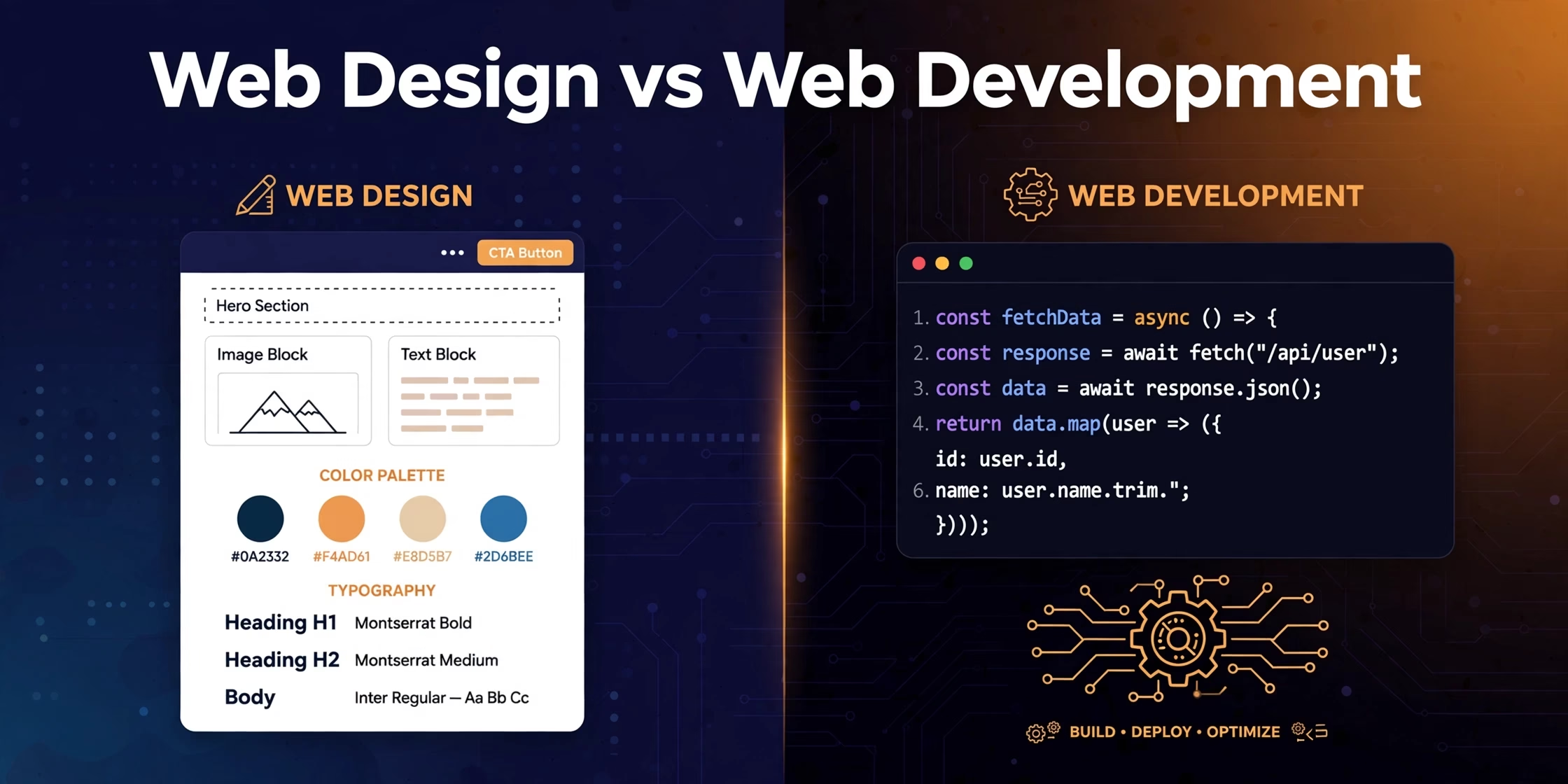
A web designer decides what your website looks like and how visitors use it: the layout, colours, typography, buttons, and the overall experience of moving through your pages. A web developer turns that design into a working website: writing the code that makes pages load, forms submit, carts check out, and the whole site function on phones, tablets, and desktops.
Think of building a house. The designer is the architect and interior designer: floor plans, the look and feel, where the doors go. The developer is the construction crew and the electrician: foundations, wiring, plumbing, everything that makes the building stand and work. A beautiful design that a developer cannot build properly is useless. And perfect construction of a confusing design still loses customers.
In practice, the two roles overlap more than job titles suggest. Many designers learn enough code to build simple sites. Many developers have strong opinions about layout. But understanding the core distinction is the first step to hiring right.
What a Web Designer Actually Does
A web designer works in the visible, experiential layer of your site. Their job starts before a single page is built and answers questions like: what should a visitor see first, where does their eye travel, and what action should they take next?
Typical design work includes:
- Layout and structure: arranging pages so visitors find what they need without thinking. This includes navigation menus, page hierarchy, and how content flows from headline to call to action.
- Visual identity: colours, fonts, spacing, and imagery that match your brand and make the business look credible. Visitors judge a business in seconds, and design does most of that judging.
- User experience (UX): planning the journey a visitor takes: from a Google search to your homepage to the contact form or checkout. Good UX removes friction; bad UX loses sales silently.
- User interface (UI): the details of the buttons, forms, icons, and interactive elements people touch. A button that is hard to find is the same as no button at all.
- Responsive design: making sure the design works on every screen size. With most traffic coming from phones, a design that only works on a desktop is a design that fails most of your visitors.
Designers usually deliver mockups, wireframes, and prototypes: visual plans of the site before it is built. Their tools are design tools like Figma and Photoshop, not code editors. A good designer’s output is a blueprint that a developer can follow exactly. To see what professional design work covers, look at our web design services page for the full picture.
What a Web Developer Actually Does
A web developer works in the functional layer: the code, databases, and systems that make the design real. If the designer drew the blueprint, the developer built the house, wired it, and connected the plumbing.
Development work includes:
- Front-end development: building the visible parts of the site in code (HTML, CSS, and JavaScript) so the designer’s mockup becomes real pages that work in browsers. This is the bridge between design and development.
- Back-end development: everything the visitor never sees: the server, the database, how form submissions are stored, how logins work, how payments are processed. When your checkout takes money securely, that is back-end work.
- Content management setup: building the site on a platform like WordPress so you can update text and images yourself without touching code.
- Integrations: connecting the site to other systems: booking software, CRMs, email tools, payment gateways, analytics. Most business websites live inside an ecosystem, and the developer wires it together.
- Performance and security: keeping the site fast, protected, and stable. A slow or hacked site loses customers no matter how good it looks.
Developers work in code editors and deal in logic, not visuals. Their success measures are different: page speed, uptime, whether the form actually delivers the email, whether the site survives a traffic spike. Our web development services cover the full technical side, from builds to performance.
Front-End, Back-End, and Full-Stack: The Three Kinds of Developer
Development itself splits into three roles, and knowing them helps you read freelancer profiles and agency quotes correctly:
| Type | Works on | Typical tasks |
|---|---|---|
| Front-end developer | What the visitor sees and clicks | Turning designs into pages, animations, mobile layouts, interactive forms |
| Back-end developer | Server, database, hidden logic | User accounts, payment processing, data storage, API connections |
| Full-stack developer | Both sides | Complete small-to-medium builds end to end, often on platforms like WordPress |
For most small business websites, a full-stack developer or a small agency team is the right fit. You only need separate front-end and back-end specialists when the project is large or technically complex: a custom web app, a marketplace, or a store with heavy integrations.
Web Design vs Web Development: Side-by-Side Comparison
| Web Design | Web Development | |
|---|---|---|
| Core question | How should it look and feel? | How should it work? |
| Main skills | Layout, typography, colour, UX/UI | HTML, CSS, JavaScript, server languages, databases |
| Typical deliverable | Mockups, wireframes, prototypes | A working, live website |
| Tools | Figma, Photoshop, Illustrator | Code editors, WordPress, frameworks, testing tools |
| Success measured by | Visitor trust, clarity, conversions | Speed, stability, functionality, security |
| Fixes problems like | “Visitors leave without contacting us” | “The contact form does not send” / “The site crashes on phones” |
Why the Confusion Costs Businesses Real Money
The design vs development mix-up is not just academic. It causes three expensive mistakes:
Mistake 1: Hiring a designer to fix a technical problem. Your site loads slowly or the booking system breaks, and you hire the person who made it look good. They cannot fix the server or the code, so weeks pass and the problem stays.
Mistake 2: Hiring a developer to fix a trust problem. Visitors arrive and leave without enquiring. The code works fine; the problem is that the homepage is confusing and the business looks unreliable. No amount of code fixes that. Honest quotes separate design and development as line items for exactly this reason, so you can see which half your money is buying.
Mistake 3: Expecting one person to do everything. A single freelancer who is genuinely excellent at both design and development exists, but they are rare. More often, someone who claims both is strong in one and weak in the other, and the weak half shows up in your results. An agency that offers both has specialists for each half, which is exactly what a full-service team provides.
Which One Does Your Project Need? A Decision Table
Match your situation to the right hire:
| Your situation | You need |
|---|---|
| Rebrand: the site works but looks outdated and untrustworthy | A web designer (then a developer to implement the new design) |
| Redesign the customer journey: visitors come but do not convert | A web designer with UX skills |
| New site from scratch on WordPress or a builder | Both: designer for the look, developer to build it properly |
| Online store, booking system, or customer portal | A developer first, with design wrapped in |
| Site is broken, hacked, or painfully slow | A developer, urgently |
| Something looks wrong only on phones | Designer and developer together (responsive work crosses both) |
Notice how often the answer is “both”. That is not upselling. A business website is a product with a surface and an engine, and neglecting either one limits the other. If you are unsure where your project falls, request a free quote on our quote page and describe your situation; the scoping conversation itself usually reveals which half you are missing.
Why Most Projects Need Both Working Together
The best websites come from designers and developers collaborating, not from one person doing both jobs in sequence. Here is why the partnership matters:
- Design without development awareness fails at launch. A designer who plans features a developer cannot build (or cannot build affordably) wastes the whole design budget. Good designers check feasibility as they design.
- Development without design awareness produces working sites nobody trusts. The code is perfect and the site still does not sell, because every page was assembled, not designed.
- SEO lives in both halves. Design controls content structure, headings, and user signals like bounce rate. Development controls page speed, mobile rendering, and technical markup. Search engines reward both, which is why our SEO services start with a technical and design audit together. For a deeper look at speed work specifically, see our guide to the best speed plugins for WordPress.
- Maintenance needs both. Updating content and seasonal promotions is design-adjacent work; updates, backups, and security are development work. A site needs both kinds of attention over its life.
How Design and Development Work Together on a Real Project
A professional build follows a sequence where design and development hand off to each other:
- Discovery: understanding your business, customers, and goals. Both designer and developer listen, because both halves serve the same goals.
- Design: wireframes, then full mockups of key pages, with your feedback and revisions. No code is written yet.
- Development: the developer builds the approved design into a working site, checking back with the designer when technical limits appear.
- Content and testing: your text and images go in; the site is tested on phones, tablets, and different browsers; forms and checkouts are tested end to end.
- Launch and handover: the site goes live, you learn how to update it, and ongoing care is arranged.
When someone offers to skip straight from a phone call to a finished website, one of these steps is being skipped, and you will pay for it later. If your current site skipped steps and now has problems, our troubleshooting guide on what to do when your website is not showing up on Google covers the most common technical symptoms and their fixes.
What to Look for When Hiring: Designer, Developer, or Agency
Once you know which half you need, the next question is who provides it. Three options:
- Freelancer: affordable and direct. Best when your project clearly needs one half, like a pure redesign or a pure technical fix. Check their portfolio for work like yours, not just work that looks impressive.
- Specialist studio: a design studio or a development shop. Best when one half dominates a larger project. Make sure they have a reliable partner for the other half.
- Full-service agency: designers and developers under one roof. Best for new builds and rebuilds where both halves matter, because the handoff between design and development happens internally instead of across two contracts. That is the model we work in; browse the full range on our services page.
Whichever you choose, ask for specifics: who exactly does the design, who exactly does the code, and what happens when the design needs something the code cannot do cheaply. Vague answers to those questions are the warning sign. Common questions about working with a web team are also answered on our FAQs page.
Frequently Asked Questions
Is web design easier than web development?
Neither is easier; they are different kinds of hard. Design demands taste, psychology, and an understanding of how people behave on screens. Development demands logic, precision, and comfort with systems that fail in invisible ways. People who say one is easy have usually only done the surface of it. The “easy” version of a website, a template with your logo dropped in, is where both halves are at their weakest.
Can one person do both web design and web development?
Sometimes, and those people are valuable for small projects. But genuine excellence in both is rare because each half takes years to master. For a business website that needs to look credible and work reliably, two specialists (or an agency with both) usually produce a better result than one generalist, at a similar total cost, because each half is done by someone who does it every day.
Which should I learn first: web design or web development?
It depends on how you think. If you are drawn to how things look and how people experience them, start with design: layout principles, typography, and a tool like Figma. If you are drawn to how things work and enjoy solving logical puzzles, start with development: HTML, CSS, then JavaScript. The two reinforce each other either way, and professionals on both sides benefit from understanding the other half. Wikipedia’s overview of web development is a solid neutral starting point for the technical side.
Do I need a web designer if I use WordPress or Wix?
The platform handles the development half, but not the design half. A template gives you structure; it does not give you a layout planned around your customers, copy placed where it persuades, or a visual identity that looks like your business rather than a thousand others. Many template sites fail for design reasons, not technical ones. If the budget only stretches to one professional, spend it on design and let the platform handle the code.
How much should a small business budget for design vs development?
There is no fixed split, because it depends on the project. A brochure site for a local service business leans toward design. A store or booking platform leans toward development. What matters is that the quote separates the two so you can see where your money goes. Our cost breakdown article walks through what small businesses actually pay for a website and the line items an honest quote should show.
What is the difference between a web designer and a UX designer?
A web designer works on websites specifically: the pages, layouts, and visuals of a site. A UX designer works on the experience of using a product, which might be a website, an app, or software, and focuses on research, user flows, and testing rather than final visuals. On small business projects the same person often does both. On larger projects they are separate roles, with the UX designer planning the journey and the web designer making it beautiful.
The Bottom Line
Web design decides what your visitors see, feel, and trust. Web development decides what your website can actually do. One without the other is either a pretty picture that does not work or a machine that nobody wants to use.
Before your next project, name which half you are hiring for, and be honest when the answer is both. If you want both halves handled by one team, with designers and developers who plan together from day one, get a free quote and tell us what your business needs the site to do.