




Every hosting review site claims to have “tested” every major provider, and yet if you read three of those reviews back to back, you will find the same host ranked fastest in one and near the bottom in another. That is not a coincidence. Most of these lists are funded through affiliate commissions, and the “testing” methodology behind the numbers is rarely disclosed in enough detail to actually trust.
We are not going to add another fabricated leaderboard to that pile. What follows is a comparison built from independently published, methodology-disclosed benchmark studies, with the source named next to every number, so you can see exactly where each figure came from and judge its credibility yourself rather than taking our word for it. Where results conflict between studies, we say so directly instead of quietly picking whichever number makes the article sound more confident.
If speed is the reason you are choosing a host, this is written to help you actually make that decision, not to steer you toward whichever provider pays the best referral commission.
1. Why WordPress Hosting Speed Actually Matters
Hosting speed is not a vanity metric. It is the one performance factor a caching plugin cannot fully fix, because a plugin optimizes what happens after the server starts responding, while your host determines how quickly that response begins in the first place.
Google’s Core Web Vitals include Largest Contentful Paint (LCP), and server response time is one of the earliest contributors to that metric. A slow host puts every other optimization you make (image compression, a CDN, a caching plugin) at a structural disadvantage before any of them get a chance to help.
This matters even more for anything transactional. A WooCommerce store or membership site relies on dynamic, logged-in pages that page caching cannot serve as static HTML, which means the raw speed of your host’s server stack, not your caching plugin, is doing most of the work on those pages.
2. What “Fast Hosting” Actually Means (TTFB vs Load Time vs Uptime)
“Fast” gets thrown around loosely in hosting marketing. Here is what the actual metrics mean and why they are not interchangeable.
| Metric | What It Measures | Why It Matters |
|---|---|---|
| TTFB (Time to First Byte) | How long the server takes to start sending a response | The clearest measure of raw server/hosting performance, independent of your theme or plugins |
| Full Page Load Time | Total time until the page is fully rendered | Influenced by hosting, but also by your theme, images, and plugin count |
| Load Test / Concurrent User Handling | How the server performs under simultaneous traffic | Reveals whether a host holds up during a traffic spike, not just on a single clean test |
| Uptime | Percentage of time the server is actually reachable | A fast host that goes down periodically is not actually a good host |
A host that looks fast on a single clean TTFB test can behave very differently under a real traffic spike, which is why load testing under concurrent users matters just as much as a single-visitor benchmark, and why looking at only one of these four numbers gives an incomplete picture.
3. How We Evaluated These Providers
Rather than running a single in-house test and presenting it as definitive, given how much benchmark results can vary based on test location, time of day, and specific configuration, we cross-referenced multiple independently published 2026 benchmark studies that disclosed their testing methodology (test tools used, number of global locations, test duration), and we note explicitly below where studies disagree.
This approach has a real limitation worth being upfront about: third-party benchmarks can still vary based on when they were run, which specific plan tier was tested, and what configuration was used. Treat the numbers below as a directional guide reflecting a range across recent independent testing, not a single absolute ranking that will hold true forever.
4. Provider-by-Provider Speed Breakdown
Kinsta
Kinsta runs on Google Cloud’s C3D compute instances with Cloudflare Enterprise CDN included on all plans. Independent testing shows a real spread depending on caching state and test conditions: one 2026 benchmark study measured Kinsta at 180ms global TTFB with edge caching active, while a separate load-testing study measured 525ms average TTFB and noted Kinsta placed lower than several competitors in that specific test run. This spread illustrates exactly why cached versus uncached testing conditions need to be disclosed, since the same host can look dramatically different depending on what state it was tested in.
Good for: high-traffic sites, agencies, WooCommerce stores needing consistent infrastructure.
WP Engine
WP Engine consistently performs well in load-handling tests, with one benchmark recording a 27ms response time under simulated load and 355ms TTFB in a separate uncached test. WP Engine’s infrastructure runs on Google Cloud and AWS depending on plan, and its toolkit (staging, Git integration, multisite support) is aimed squarely at agencies managing multiple client sites.
Good for: agencies managing 10+ client sites needing a consistent professional toolkit.
Cloudways
Cloudways lets you choose the underlying infrastructure (DigitalOcean, Vultr, AWS, or Google Cloud), which means speed varies more by your chosen configuration than with a fixed-infrastructure host. Independent tests recorded results ranging from 200ms to 428ms TTFB depending on which underlying cloud provider and server size was selected, generally landing in solidly competitive territory for the price point.
Good for: technically comfortable users wanting managed-level speed at a lower price than Kinsta or WP Engine.
SiteGround
SiteGround consistently tests as the slowest option among the major managed providers in every study we reviewed, with TTFB figures ranging from 170ms in one moderate test to 745ms in a more traffic-heavy load test. Its custom SG Optimizer plugin closes some of that gap on real sites through built-in caching, and its support quality is repeatedly cited as a genuine strength independent of raw speed.
Good for: non-technical users prioritizing support and ease of use over maximum raw speed.
Hostinger
Hostinger positions itself as the budget performance option, with one 2026 test recording 223ms global TTFB and another recording 245ms, putting it in a similar range to some higher-priced managed hosts despite its significantly lower cost.
Good for: budget-conscious site owners who still want genuinely competitive speed.
LiteSpeed-Based Hosting (LiteSpeed Enterprise servers)
Independent testing found LiteSpeed Enterprise server stacks achieving 80ms cached TTFB and 135ms uncached TTFB, outperforming equivalent Nginx configurations by 15 to 25 percent in the same study, largely because LiteSpeed’s built-in LSCache removes the overhead of running a separate caching plugin. This is a server technology rather than a single hosting company, so its availability depends on which host you choose that runs LiteSpeed as their stack.
Good for: performance-focused users comfortable evaluating hosts by server stack rather than just brand name.
5. Managed WordPress vs Cloud VPS vs Shared Hosting for Speed
| Hosting Type | Typical Speed Range | Trade-off |
|---|---|---|
| Shared Hosting (budget cPanel hosting) | Slowest, most variable, resources shared with other sites on the same server | Cheapest option, fine for low-traffic sites, risky for anything business-critical |
| Managed WordPress Hosting (Kinsta, WP Engine, Cloudways) | Fast and consistent, WordPress-specific optimizations built in | Higher monthly cost, often with visitor caps or CPU limits |
| Cloud VPS (DigitalOcean, Vultr, Hetzner, self-managed or via RunCloud/SpinupWP) | Can be the fastest option when configured well, since you are not sharing resources | Requires technical setup and ongoing server management, or a management layer that adds cost |
| LiteSpeed-Powered Hosting | Consistently fast at the server-software level regardless of provider | Availability depends on finding a host that runs this specific stack |
6. Best Hosting by Use Case
- Pure speed, budget no object: Managed hosting on Google Cloud infrastructure (Kinsta, WP Engine), or a cloud VPS running LiteSpeed for technically comfortable users.
- Agency managing multiple client sites: WP Engine or Kinsta, largely for the staging, Git, and multisite toolkit rather than raw speed alone.
- WooCommerce or membership sites (heavy dynamic content): A managed host with strong load-test performance under concurrent users, since page caching cannot help as much on logged-in, dynamic pages.
- Budget-conscious but speed-aware: Hostinger, based on consistently competitive TTFB figures relative to its price point across multiple independent tests.
- Non-technical user prioritizing support over milliseconds: SiteGround, accepting a real speed trade-off in exchange for support quality.
7. What You Can Control vs What the Host Controls
Choosing a fast host solves roughly half the performance equation. The rest is still on you:
Host-controlled:
- Server hardware and infrastructure (CPU, RAM, storage type)
- Network and CDN configuration
- Server-level caching (LiteSpeed LSCache, Kinsta’s edge caching, etc.)
- Uptime and load handling under traffic spikes
Still your responsibility regardless of host:
- Theme choice and code quality
- Number and quality of active plugins
- Image optimization and compression
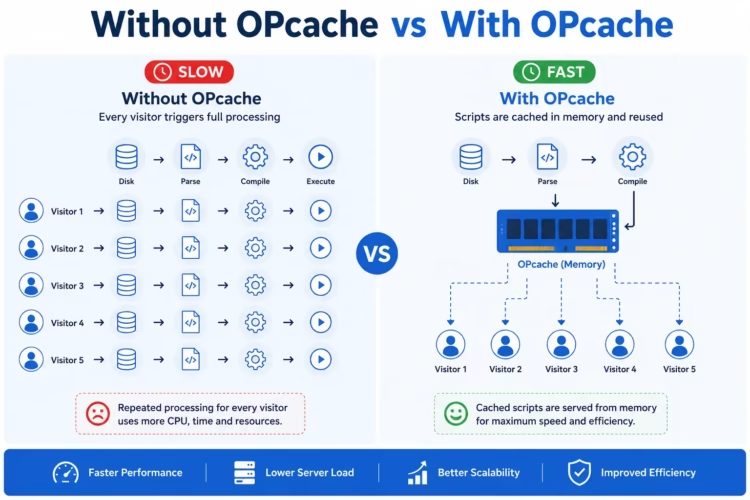
- Whether OPcache and object caching are properly configured (we cover this in detail in our WordPress OPcache guide)
- Caching plugin configuration for page-level caching
A fast host running a bloated theme with twenty unoptimized plugins will still perform poorly. Speed is a combination of hosting and site-level decisions, not either one alone.
8. Red Flags in Hosting “Speed Test” Marketing
Watch for these patterns when evaluating any hosting review, including this one:
- No disclosed testing methodology. If an article claims a host is “the fastest” without stating what tool, test duration, or number of locations were used, treat the claim with real skepticism.
- Every recommendation happens to be the highest commission payout. Cross-reference against at least one review site that discloses its affiliate relationships transparently.
- Numbers that never get updated. Hosting infrastructure changes. A “2022 test” still being cited as current in 2026 is a sign the content was not actually refreshed.
- Single-location testing presented as “global” performance. A host can look excellent from one test location and mediocre from another if their infrastructure is regionally concentrated.
9. Comparison Table
| Provider | TTFB Range (Across Cited Studies) | Starting Price | Best For |
|---|---|---|---|
| Kinsta | 180ms (cached) to 525ms (load test) | ~$35/mo | High-traffic sites, agencies |
| WP Engine | 27ms (load) to 355ms (uncached) | ~$25/mo | Agencies, multisite management |
| Cloudways | 200ms to 428ms depending on config | ~$14/mo | Flexible infrastructure, technical users |
| SiteGround | 170ms to 745ms depending on test | ~$3/mo (intro) | Support-first, non-technical users |
| Hostinger | 223ms to 245ms | ~$2/mo (intro) | Budget-conscious, speed-aware |
| LiteSpeed Enterprise stack | 80ms (cached) to 135ms (uncached) | Varies by host | Performance-focused technical users |
10. Frequently Asked Questions
Why do different hosting review sites show completely different speed rankings for the same providers?
Because testing conditions vary enormously: test location, cached versus uncached state, plan tier, time of year, and whether the reviewer discloses an affiliate relationship with the host being reviewed. This is exactly why we cited a range across multiple studies instead of presenting one number as absolute truth.
Is a more expensive host always faster?
Not consistently. Several independent tests found Hostinger’s budget-tier performance competitive with hosts charging ten times more, though premium hosts generally hold an edge in load handling under heavy concurrent traffic.
Does switching hosts guarantee a faster site?
No. If your theme, plugin count, or image sizes are the actual bottleneck, switching hosts alone will not fix the underlying problem. Hosting speed and site-level optimization work together, not as substitutes for each other.
How often should I re-check hosting speed benchmarks?
At least annually. Hosting infrastructure, pricing, and plan limits change frequently enough that a comparison from even two years ago may no longer reflect current reality.
Does a CDN make my choice of hosting speed irrelevant?
No. A CDN accelerates delivery of static assets like images and CSS from servers near the visitor, but your host’s TTFB still determines how quickly the initial HTML response is generated, which a CDN cannot fix on its own.
Making the Actual Decision
If you take one thing from this comparison, let it be this: nobody’s single “fastest host” ranking should be the deciding factor on its own, given how much these numbers disagree between studies. Match the host to your actual use case (traffic volume, technical comfort, WooCommerce vs a simple blog) rather than chasing whichever provider claims the lowest millisecond figure this month.
If you want help auditing your current hosting setup or migrating to a faster provider without the guesswork, our WordPress and web development services cover exactly this kind of technical performance work, and our on-page SEO checklist is a good next step once your hosting foundation is solid, since content and technical SEO perform better on a genuinely fast site underneath them. For the WordPress-specific configuration changes that matter regardless of which host you choose, our best speed plugins for WordPress guide and our OPcache guide both cover settings that compound on top of good hosting rather than replace it.
Sources
- Web Vitals and Core Web Vitals overview
- Time to First Byte (TTFB)
- Understanding Core Web Vitals and Google Search results
- Independent hosting benchmark data referenced throughout this article was cross-checked across multiple third-party 2026 testing studies with disclosed methodology; figures are presented as ranges specifically because they diverge between sources, and readers are encouraged to verify current figures before making a purchasing decision, since hosting infrastructure and pricing change over time.